I Locked Myself Out of PostgreSQL Trying to Make It Secure Building a Secure PostgreSQL Server with Docker & Cloudflare R2 — Part 1
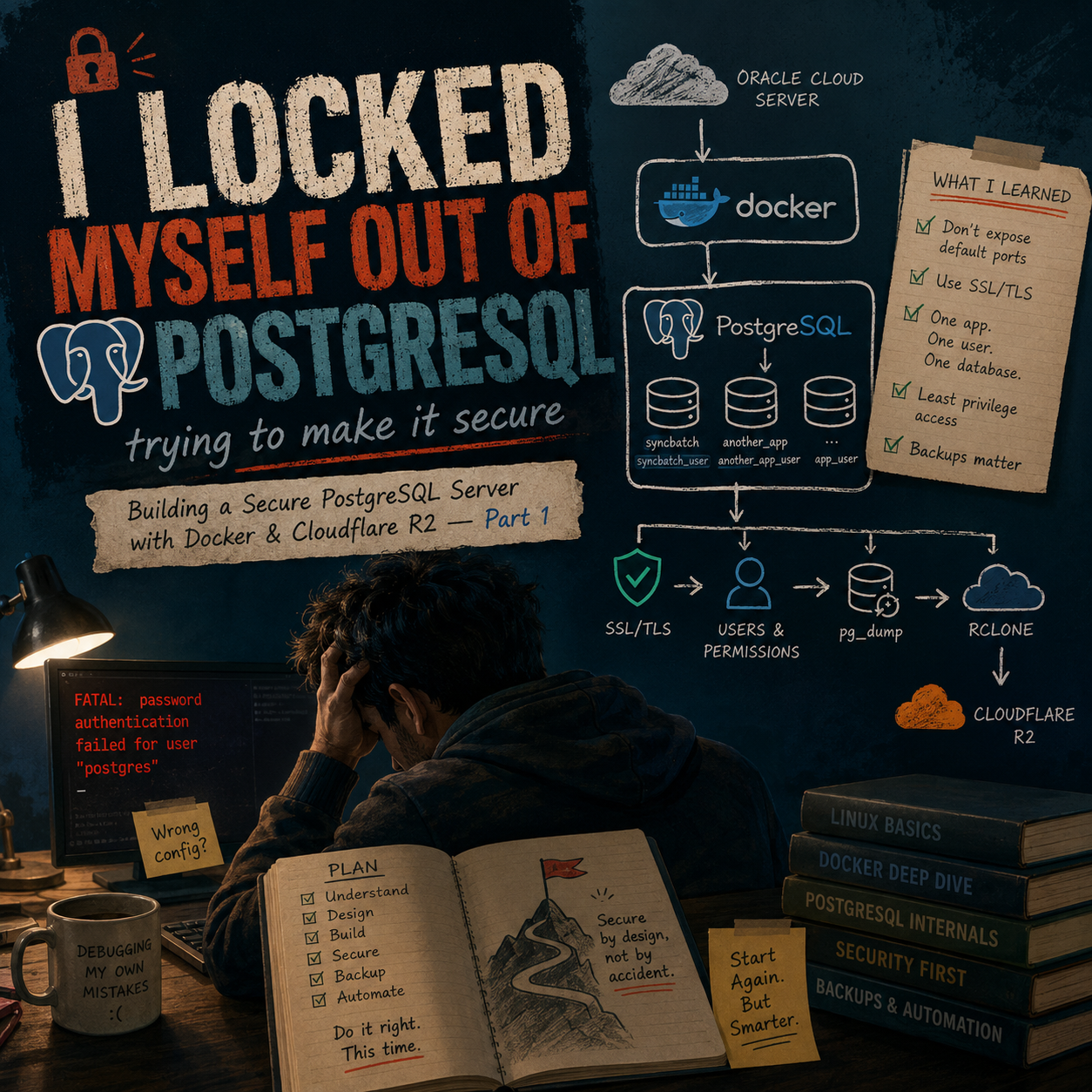
All I wanted was a secure PostgreSQL setup in Docker. Somehow, direct copy-pasting locked me out of my own database. 🥲 What went wrong? And what did I learn from breaking my own setup? This is the story of starting over - but this time, actually understanding what I was building.

Published and syndicated from the Inovus Labs engineering publication by Amith Abey Stephen.
Well.... this ain't a big story or something new. But honestly, I feel this is one of those things that clears out the basics we should actually learn.
And this whole thing started because of our dear Naveen Joseph Chettan.
If you've been around me for a while, you probably know this already,that weekly 3 dasy we get to meet each other in train while travelling to office.(This is the time when we just our deep talks- talks about the days, work, his home server setup) & every time he talks about the setups he has in his home servers....The main thing i hear is security reasons: how he isolates things.... how he doesn't just expose everything to the internet.... how every service has its own access.... backups.... certificates.... all those things, but nothing leaves his network.
And every time he talks about it I'm like....
"Ufff.... I should probably learn this, focus more on security side too rather than just simple copy paste." 😂
For a long time i had this urge to do it in proper best way.So....
I finally decided to actually do it.
So first.... let's get the basic picture clear.
I have an Oracle Cloud server. That's my actual server.
And instead of installing PostgreSQL directly onto Ubuntu, I wanted PostgreSQL to run inside Docker.
So the basic architecture was something like:
Oracle Cloud Server
↓
Docker
↓
PostgreSQL container
↓
Multiple databases
And the goal wasn't just:
"Run PostgreSQL somewhere."
I wanted to understand how to run it in a reasonably secure way. So I made myself a small checklist. I wanted:
- PostgreSQL running inside Docker
- Don't expose PostgreSQL using the default port
- Don't allow random direct access
- Use SSL/TLS for secure connections (encrypts the data sent between your browser and a website)
- Give every application its own database user
- Make sure one application's user cannot access another application's database
Sounds pretty clear now.
But....
It wasn't clear to me at the beginning.
And that became the biggest problem.
Round 1 — I just followed ChatGPT
So I did what probably most people would do. I took all these requirements....gave them to ChatGPT.... and started following the instructions. Step by step.
Copy this. Create this file. Paste that.
Change this configuration. Run this command.
Restart Docker. Check PostgreSQL.
Change pg_hba.conf. Configure SSL. Create users. Create databases. Change ports.
Add permissions. Run another command.
And I kept going. Everything looked fine.... until it wasn't. 🥲
The problem wasn't that ChatGPT wasn't giving me commands.
The problem was I was executing commands without having a proper picture of what I was building.
I knew individual pieces. But I didn't properly understand how all those pieces were supposed to fit together.
Individualy i had my exposed port a random one, configured ssl config, created users, db, etc gave permissons to user etc.....and it went on like too far that I couldn't properly access my own database anymore. 😭
Like i ran more commands without a clear end goal and when finaly it said its ready i tried creating a new db, but nah authentication failed. i was like bruh!!
I knew I was doing it wrong
I remember thinking:
"Okay.... I'm definitely doing something wrong here."
But I kept trying to fix it, but my mindset was:
"Well what am i doing, what do i need...what actually is my end goal!"
Except I wasn't really figuring it out. I was patching things. And eventually....
I got frustrated. Closed everything.
At that point I understood almost nothing about what state the server was actually in. So instead of continuing to pile more configuration on top of a setup I didn't understand....
I decided to stop.
Delete everything. Start again.
Later that day, I logged back into the Oracle server.
And this time I did something drastic. I cleared the Docker setup.
Removed the containers. Removed the PostgreSQL volume/data. Removed the configurations I had been experimenting with.
Basically....
Fresh start.
The server was still there. But the PostgreSQL/Docker setup was clean again. And honestly....
That felt much better.
Because now I wasn't trying to repair something I didn't understand. I could build it again.
But this time....I wanted to know what I was actually building before I started throwing commands at the terminal. Like a clear definition of my end goals.
So I called Naveen chettan.
This was probably the most useful step of the whole experiment.
Instead of asking:
"Chetta, why is this command failing? Why am i not able to log back in even with correct credentials..."
I asked something much more important.
"What exactly should I build?"
I wanted to know:
- What's actually important here?
- What should I secure?
- What doesn't need to be over-engineered?
- What should the final setup look like?
- What should I understand myself?
- And where am I just blindly following ChatGPT?
That conversation changed the way I approached the whole thing.
Because I finally had an end goal.
Not:
"Make PostgreSQL secure."
That's way too vague.
But something much more concrete.
This is what I actually wanted
I wanted one Oracle server. Inside that server, Docker would run PostgreSQL. Something like:
Oracle Cloud VM
│
└── Docker
     │
     └── PostgreSQL
          │
          ├── Database: syncbatch
          │     └── User: syncbatch_user
          │
          ├── Database: another_app
          │     └── User: another_app_user
          │
          └── Database: ...
The PostgreSQL superuser would be the administrator. Application users would not be superusers. Each application would get its own database and its own credentials.
Then access to PostgreSQL from outside would be restricted and encrypted.
And finally....
PostgreSQL backups would be created on the server, temporarily stored locally, and then pushed to Cloudflare R2.
Something like:
PostgreSQL
    ↓
 pg_dump
    ↓
Compressed backup
    ↓
Local backup folder
    ↓
   rclone
    ↓
Cloudflare R2
And later, cron could automate when that backup script runs.
Now....
This made sense.
I had clear idea of what each steps result is, Goal fo each step its final outcome. And that was the difference between my first attempt and the second one.
So now.... let's actually build it.
With the end goal clear, I could finally start from the bottom.
First:
The Oracle server.
Then:
Docker.
Then:
PostgreSQL.
Then:
Persistent storage.
Then:
PostgreSQL configuration.
Then:
SSL/TLS.
Then:
Admin authentication.
Then:
Database-specific users.
Then:
Permissions.
Then:
Backups.
Then:
Cloudflare R2.
Then:
rclone.
And finally:
Automation.
Not all at once. Not by blindly pasting a giant configuration. One layer at a time. And this time....
if something breaks, I want to know which layer broke and why. That was the actual beginning of Round 2 (Coming Soon).
Enjoyed this reflection?
Read community comments, responses, and join the discussion directly on Inovus Labs.
Discuss on Inovus Labs Blog