How Curiosity Turned Old PCs Into Servers
What started as random junk PCs lying around at INOVUS slowly turned into self-hosted Linux servers. This is the story of how curiosity, broken systems, endless errors, and experiments taught us networking, Linux, SSH, self-hosting, and the joy of learning by simply trying things out.

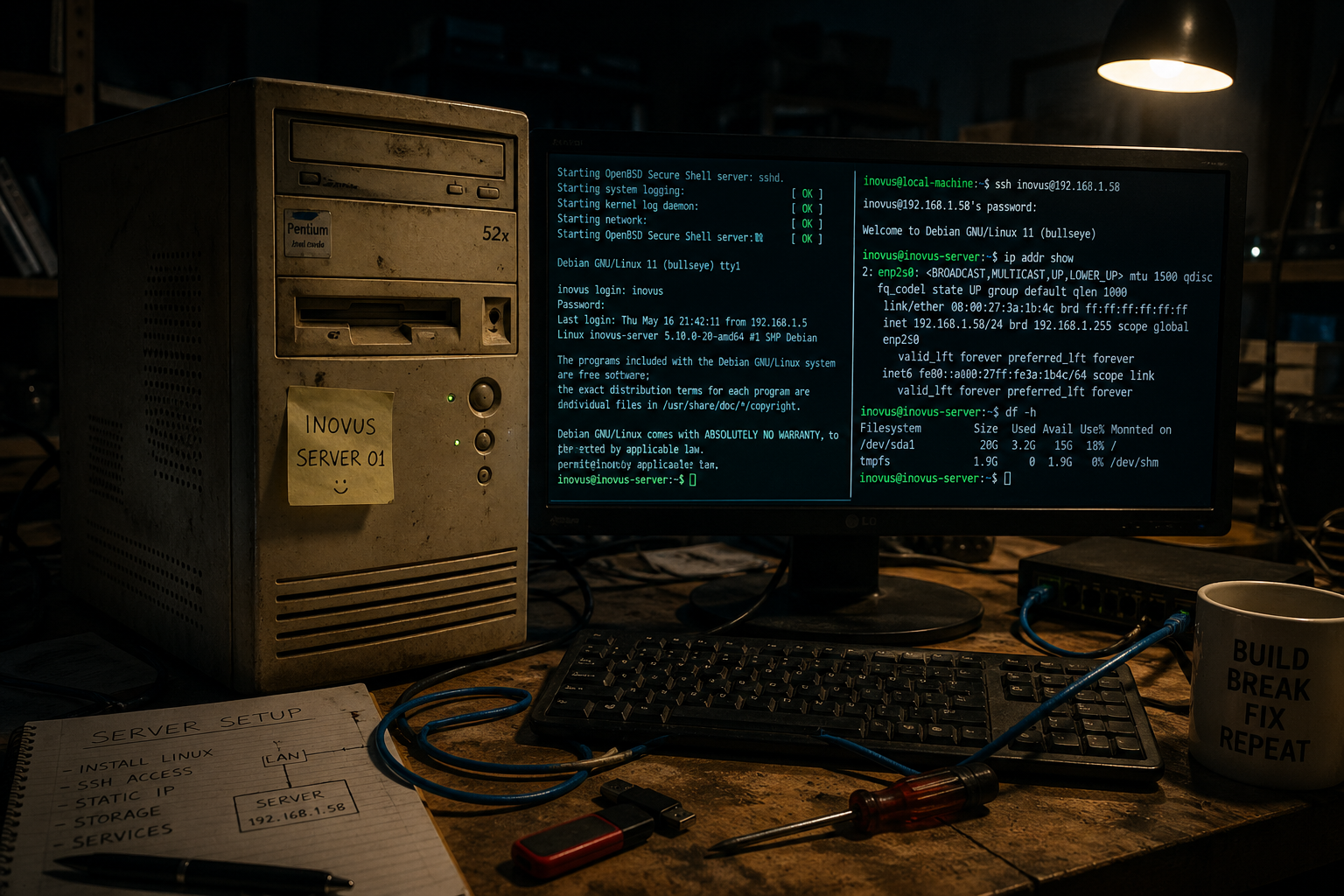
<span style="white-space: pre-wrap;">Image Generated by AI</span>
Published and syndicated from the Inovus Labs engineering publication by Amith Abey Stephen.
There’s something weirdly special about old computers. Especially the ones everyone else calls “junk." For a long time at INOVUS, we had all sorts of random systems lying around — damaged CPUs, dead PCs, low-spec Pentium machines, systems with missing RAM, systems that wouldn’t boot, systems people had completely given up on. Most people would look at them and think, “scrap.” But for me and Sane, We looked at them and thought:
“hmmm… what if we try something with this?” And honestly… that single curiosity probably taught us more than many proper classes. The funny part is…
we never even had some big master plan.
We weren’t trying to become some huge data center people.
We weren’t trying to build enterprise infrastructure.
We weren’t even fully sure what we were doing most of the time 😭 We were just curious. That’s it. One random day we’d suddenly decide:
“yo let’s make this a server.” Then another day: “bro let’s try Docker.” Then: “what if we setup RAID?” Then: “can we host websites ourselves?” Then: “can we access this remotely?” Then: “bro imagine running AI locally.” And slowly one thing led to another.
Every setup became another experiment. And trust me… things broke A LOT. Like a lot a lot.
Sometimes the OS wouldn’t boot.
Sometimes network wouldn’t work.
Sometimes storage disappeared.
Sometimes SSH broke.
Sometimes we ourselves had no clue what command we just typed 😭
But somehow that was the best part. Because every error forced us to learn something new. You stop being scared of systems once you break them enough times and fix them again.
And after finally fixing everything… instead of peacefully using it… we’d literally go:
“ok nice… now wipe the whole thing and try something else.” And we’ve done this cycle sooo many times.
Install.
Break.
Fix.
Learn.
Wipe.
Repeat.
Looking back now… those were probably some of the best learning phases ever.
I still remember one specific moment very clearly. Badhusha once asked me to boot a system. And I was just standing there like: ““what even is booting?”, He handed me a pendrive and casually said:
“Windows is inside it… boot it.”
And I was like: “ehhhhhh… ok?” At that time ChatGPT had literally just released and wasn’t even famous. So there weren’t instant answers everywhere like now. Bro I had thousands of doubts, clicking random BIOS options carefully trying not to destroy the PC.
Then Sane came in and asked: “what are you doing?” And I was like: “he told me something about boot or something idk please help.” And honestly… that tiny random moment was probably the starting point for so many things later.
Now?
I’ve booted systems countless times.
Installed Linux so many times.
Broken partitions.
Recovered systems.
Configured networks.
Setup servers.
Mounted drives.
Configured SSH.
Done remote access.
And it feels funny remembering how impossible it once sounded.
Anyways… recently we setup two systems as servers.
Why? Even I don’t fully know.
But yeah… learning DevOps, self-hosting things, having our own infrastructure… it just feels cool. Feels proud. Like:
“wait… we actually own servers now?”
Even though they are literally old Pentium systems 😭. And no… don’t imagine some crazy AI datacenter. These systems are weak.
Very weak.
But that’s the fun part.
We took both systems and installed Linux Server OS. Now for non-tech people… Normally when people think of operating systems they think of Windows — where everything has icons, mouse clicks, menus etc.
That style is called GUI (Graphical User Interface). Linux also has GUI versions. But Linux Server OS is usually CLI based. CLI means Command Line Interface. Instead of clicking icons… you type commands. It sounds scary initially. But it makes the system extremely lightweight because there’s no heavy graphics running.
During setup we configure things like:
- storage
- partitions
- network
- users
- packages
- etc
After installation we installed something called OpenSSH. This is what allows us to remotely access the server from another computer. SSH stands for: Secure Shell. Basically… It allows us to remotely access the server from another computer. Meaning… we don’t need to sit in front of the server every time.
No monitor needed.
No keyboard needed.
No mouse needed.
Just terminal access through network.. If both systems are connected to the same network, we can simply type:
ssh username@host_ipExample:
ssh inovus@192.168.x.xxBut first we need the server’s IP address.
Inside the server we can type:
ip addr showThen look for something like:
2: enp2s0:And inside that:
inet 192.168.1.58/24That 192.168.1.58 is the local IP address of the server.
So now from another system we can simply do:
ssh inovus@192.168.1.58And boom.
We get access to that server directly from our terminal.
No monitor needed.
No keyboard needed.
Just terminal access through network.
But… there’s one annoying problem. Remembering these IP addresses every single time is painful 😭 And that’s where things start getting more interesting.
Stay tuned for Part 2!
Enjoyed this reflection?
Read community comments, responses, and join the discussion directly on Inovus Labs.
Discuss on Inovus Labs Blog